
What the Deposit Screen Shows
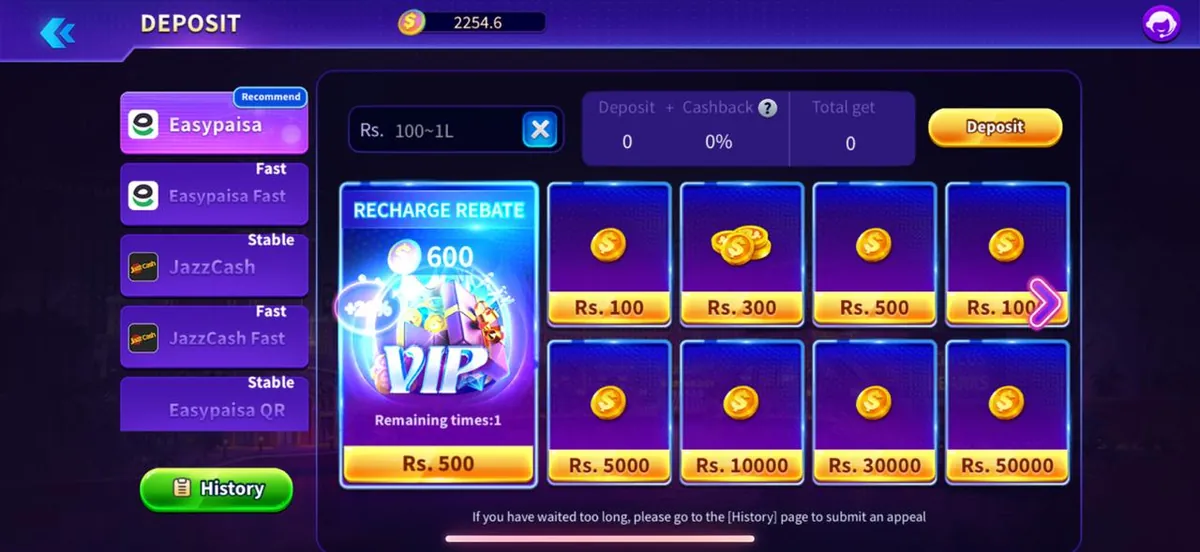
Down the left side is the method list, with small labels such as Recommend, Fast or Stable attached to individual entries. In the middle sits the amount field, showing the accepted range as placeholder text. To the right you will see the total you will receive, along with any cashback percentage the current campaign applies.
Below that are preset amount tiles. Tapping one fills the amount field for you, which is quicker and avoids typing mistakes. A History button at the bottom-left opens your past transactions, and that is also where an appeal is raised if a payment does not arrive.
How to Make a Deposit
Do not close the payment screen while a transfer is being confirmed. If you leave too early, the payment may complete on the provider side while the app is still waiting, which is exactly the situation the History screen exists to resolve.
- Open the lobby and tap Deposit on the bottom bar.
- Choose a payment method from the list on the left.
- Enter an amount inside the range shown, or tap a preset tile.
- Check the total you will receive, including any cashback shown.
- Confirm, and complete the payment in the app or page that opens.
- Return to the lobby and check that your balance has updated.
Payment Method Labels
If a method is greyed out, pick another rather than retrying repeatedly. Methods are enabled and disabled on the platform side and a greyed entry will not work simply because you tap it again.
| Label | Meaning |
|---|---|
| Recommend | Method the app currently suggests first |
| Fast | Usually confirms more quickly |
| Stable | Fewer failed attempts reported |
| Greyed out | Temporarily unavailable for your account |
Deposit Problems and What to Do
Screenshots help. Capture the payment confirmation and the deposit screen before contacting support, and include your player ID with any appeal about a 2funbet deposit.
| Problem | What to do |
|---|---|
| Money sent, balance unchanged | Open History and submit an appeal with the reference |
| Amount rejected | It is outside the allowed range — adjust it |
| Method fails repeatedly | Try a different method from the list |
| Payment app does not open | Check that app is installed and signed in |
| Wrong amount entered | Use a preset tile next time to avoid typing errors |
Deposit Safety Rules
- Only deposit from inside the app or the official lobby, never through a link someone sends you.
- Never share your password or verification code with anyone offering to top up for you.
- Start with a small amount the first time so you can see the whole flow end to end.
- Keep the payment reference until your balance updates.
- Only spend what you can comfortably afford to lose. 18+ only.
Third-party agents offering discounted top-ups are a common scam. Use the in-app deposit screen only.— 2Fun Bet editorial team
Frequently Asked Questions
Q1.How do I deposit on 2Fun Bet?
Tap Deposit on the bottom bar of the lobby, pick a method from the left-hand list, enter an amount inside the shown range or tap a preset tile, confirm, and complete the payment in the app that opens. Your balance updates once the payment is confirmed.
Q2.What is the minimum 2Fun Bet deposit?
The accepted range is displayed as placeholder text in the amount field and can differ by method and region. Read the range shown on your own deposit screen rather than relying on a fixed figure quoted elsewhere.
Q3.My deposit did not arrive — what now?
Open the History screen from the deposit page, find the transaction, and submit an appeal with the payment reference and your player ID. Keep a screenshot of the payment confirmation, as that is the fastest evidence to provide.
Q4.Which payment methods are supported?
The method list on the deposit screen is the accurate answer for your account, because availability varies by region and changes over time. Labels such as Recommend, Fast and Stable show which entries the app currently favours.
Q5.Is there a deposit bonus?
The deposit screen shows any cashback percentage the current campaign applies, next to the total you will receive. Because campaigns rotate, treat the figure on your own screen as the only reliable one.
Conclusion
A 2Fun Bet deposit is method, amount, confirm — with the History screen as your safety net if anything gets stuck.
Read the withdrawal page next so you know both halves of the wallet before you add funds.
Related Pages
2Fun Bet Editorial Team
Last reviewed: 16 September 2026